How Virtual Patching Works: The Mechanics Behind Inline Protection
Virtual patching intercepts traffic before it reaches the application, allowing defenders to block exploits without touching the underlying code or restarting services.
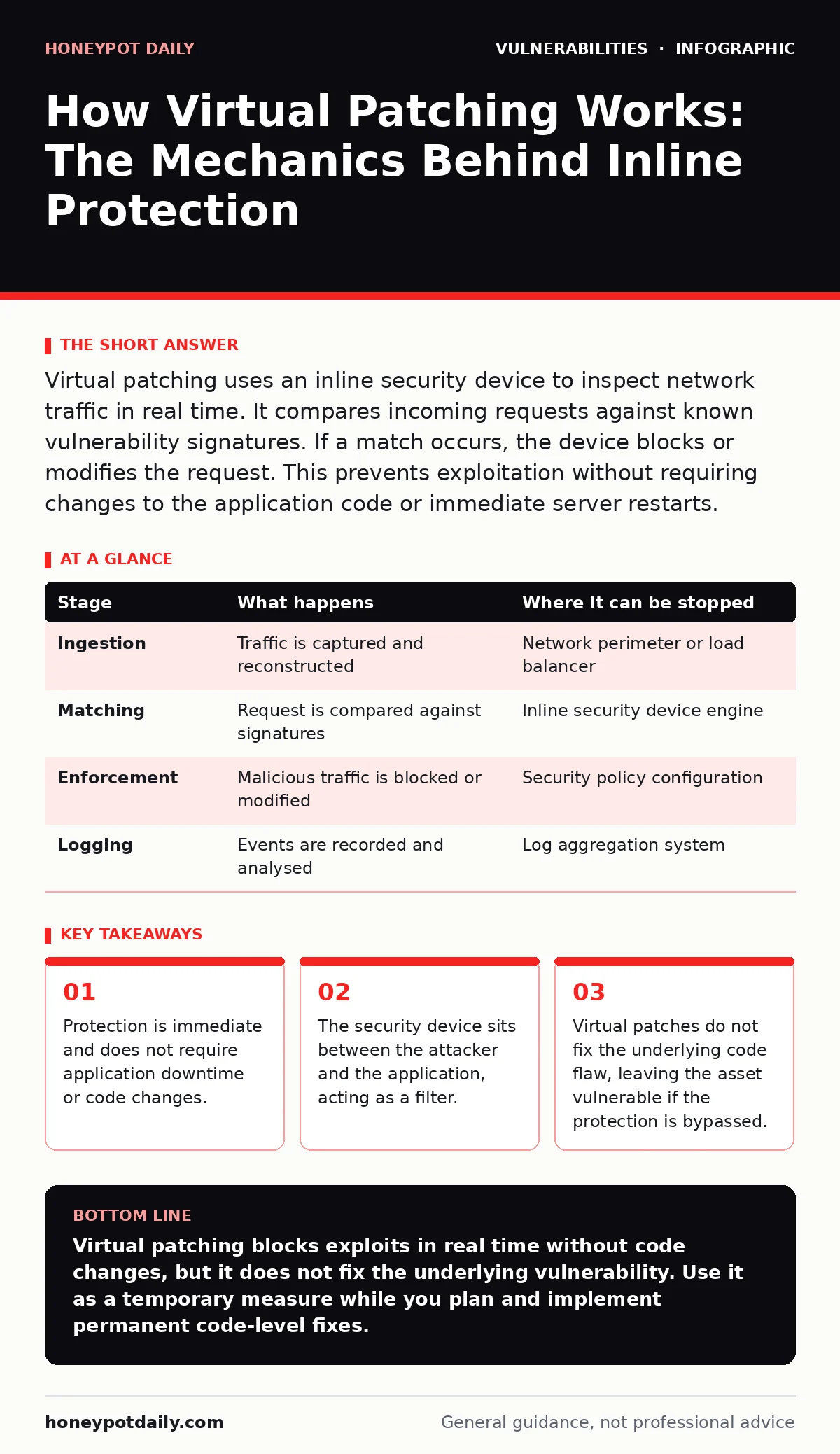
Virtual patching uses an inline security device to inspect network traffic in real time. It compares incoming requests against known vulnerability signatures. If a match occurs, the device blocks or modifies the request. This prevents exploitation without requiring changes to the application code or immediate server restarts.
The Architecture of Interception
Virtual patching relies on placing a security enforcement point directly in the data path. This device, often a web application firewall or an inline intrusion prevention system, sits between the internet and your application server. It does not modify the application itself. Instead, it examines every packet that attempts to reach the service.
The core assumption is that you can identify the specific pattern of a malicious request. When the device sees traffic matching that pattern, it intervenes. This intervention happens before the application ever processes the data. The application remains unaware of the attack attempt.
This architecture shifts the burden of protection from the application layer to the network perimeter. It allows security teams to respond to threats in minutes rather than days or weeks. However, it introduces a new dependency on the inline device’s configuration and performance.
### Stage 1: Traffic Ingestion
The process begins when a client sends a request to your server. This could be a standard HTTP GET request or a complex POST submission. The inline device captures this traffic at the wire level. It reconstructs the stream of packets into a coherent request object.
At this stage, the device performs basic sanitisation. It checks for protocol compliance and ensures the data structure is valid. If the request is malformed, it may be dropped immediately. This prevents certain types of buffer overflow attacks that rely on chaotic data structures.
The device must handle the full volume of incoming traffic. Any latency introduced here affects the user experience. Therefore, the ingestion engine is optimised for speed, often using hardware acceleration or specialised processors. It does not yet know if the traffic is malicious; it is merely preparing the data for deeper inspection.
### Stage 2: Signature Matching
Once the request is reconstructed, the device applies its rule set. These rules are derived from vulnerability intelligence. Each rule describes the specific sequence of characters or parameters that trigger a known exploit. For example, a rule might look for a specific SQL injection string in a login field.
The engine compares the request against thousands of these signatures. This is a pattern-matching exercise. The device looks for exact matches or fuzzy patterns that indicate an attack vector. It checks headers, query strings, and body content.
This step is computationally expensive. To maintain performance, devices use efficient data structures like Bloom filters or finite state machines. These structures allow for rapid rejection of benign traffic while thoroughly inspecting suspicious patterns. The goal is to identify the threat with minimal false positives.
### Stage 3: Decision and Enforcement
If a signature matches, the device triggers a decision engine. This engine evaluates the context of the match. It considers the source IP, the time of day, and the severity of the vulnerability. Based on this context, it selects an action.
The most common action is blocking. The device sends an error response to the client, such as a 403 Forbidden status. The malicious request never reaches the application. Alternatively, the device might modify the request. It strips out the malicious payload and forwards the sanitised data.
This enforcement is transparent to the application. The application receives either nothing or clean data. It continues to operate normally. The attacker, however, receives an unexpected response. This signals that their exploit failed, though they may not know why.
### Stage 4: Logging and Telemetry
Every decision made by the device is recorded. These logs include the source IP, the matched signature, the action taken, and the timestamp. This data is critical for forensic analysis. It helps security teams understand the scope of the attack.
The device also aggregates this data into telemetry reports. These reports highlight trends and emerging threats. They show which vulnerabilities are being targeted most frequently. This information feeds back into the rule set, allowing for continuous improvement.
Logging must be balanced against privacy and storage costs. Sensitive data in requests must be masked or excluded. Retention policies ensure that logs are kept long enough for investigation but not so long that they become unwieldy. This stage closes the loop, providing visibility into the protection mechanism.
| Stage | What happens | Where it can be stopped |
|---|---|---|
| Ingestion | Traffic is captured and reconstructed | Network perimeter or load balancer |
| Matching | Request is compared against signatures | Inline security device engine |
| Enforcement | Malicious traffic is blocked or modified | Security policy configuration |
| Logging | Events are recorded and analysed | Log aggregation system |
See also: CVSS 4.0 Misreadings: What Security Teams Get Wrong · Industrial Control System Vulnerabilities: Hidden Risks and Fixes
The Hidden Costs of Inline Protection
Virtual patching introduces a single point of failure. If the inline device fails, traffic may be dropped or allowed through unchecked. This creates a risk of availability loss. Redundancy is required to mitigate this risk.
There is also a configuration burden. Rules must be updated regularly to keep pace with new threats. Misconfigured rules can block legitimate traffic, causing operational disruptions. This requires skilled personnel to manage the device.
Performance impact is another hidden cost. Deep inspection consumes resources. High-traffic environments may need significant hardware investment to maintain low latency. This cost is often overlooked in initial planning.
Limits of the Mechanism
Virtual patching does not fix the code. The vulnerability remains in the application. If an attacker finds a way to bypass the inline device, the application is exposed. This can happen through encrypted traffic that the device cannot inspect.
It also does not protect against zero-day exploits. These are unknown vulnerabilities with no existing signatures. Until a rule is created, the device cannot block them. This leaves a window of exposure.
Furthermore, it does not address logical flaws. If an application allows a user to access data they should not, based on business logic rather than code injection, virtual patching may not detect it. This requires a different approach to security.
Integration with Broader Strategies
Virtual patching works best when combined with other practices. It provides immediate protection while you work on permanent fixes. This aligns with the goals of change management for security patches, which often involves scheduling and testing.
It complements exposure management by reducing the attack surface. By blocking known exploits, you lower the risk of successful compromise. This is particularly useful for legacy systems that cannot be easily updated.
However, it should not replace proper input validation. Virtual patching is a defence in depth layer, not a substitute for secure coding. It buys time, but it does not eliminate the need for robust application security.
Balancing Speed and Security
The primary advantage of virtual patching is speed. It allows you to protect assets immediately after a vulnerability is disclosed. This is critical for high-risk environments.
The trade-off is complexity. You must manage the inline device, update rules, and monitor performance. This adds operational overhead.
Use virtual patching as a bridge, not a destination. Plan to apply permanent fixes as soon as possible. This ensures long-term security and reduces reliance on external devices.
Key takeaways
- Protection is immediate and does not require application downtime or code changes.
- The security device sits between the attacker and the application, acting as a filter.
- Virtual patches do not fix the underlying code flaw, leaving the asset vulnerable if the protection is bypassed.
- This method serves as a temporary bridge until permanent code-level fixes are deployed.
Virtual patching blocks exploits in real time without code changes, but it does not fix the underlying vulnerability. Use it as a temporary measure while you plan and implement permanent code-level fixes.
Frequently asked questions
Does virtual patching fix the vulnerability in the code?
No, it only blocks malicious traffic from reaching the application. The code flaw remains until a permanent patch is applied.
Can virtual patching be bypassed?
Yes, if the inline device is misconfigured, offline, or if the attacker uses encryption that the device cannot inspect.
How does virtual patching differ from a WAF?
A WAF is a device that can perform virtual patching. Virtual patching is the technique of blocking exploits inline, which can be done by a WAF or other inline security tools.
Is virtual patching suitable for all applications?
It is most suitable for critical applications that cannot be taken offline for patching. It adds complexity and cost, so it should be used judiciously.
How this guide was produced: written by the Honeypot Daily editorial team with AI assistance, checked against the public references listed below, and reviewed when the facts change. See our editorial policy or report an error.