Fake Software Updates: How to Spot and Block Deceptive Patches
Legitimate update mechanisms are often hijacked or mimicked, turning routine maintenance into a primary vector for persistent malware installation.
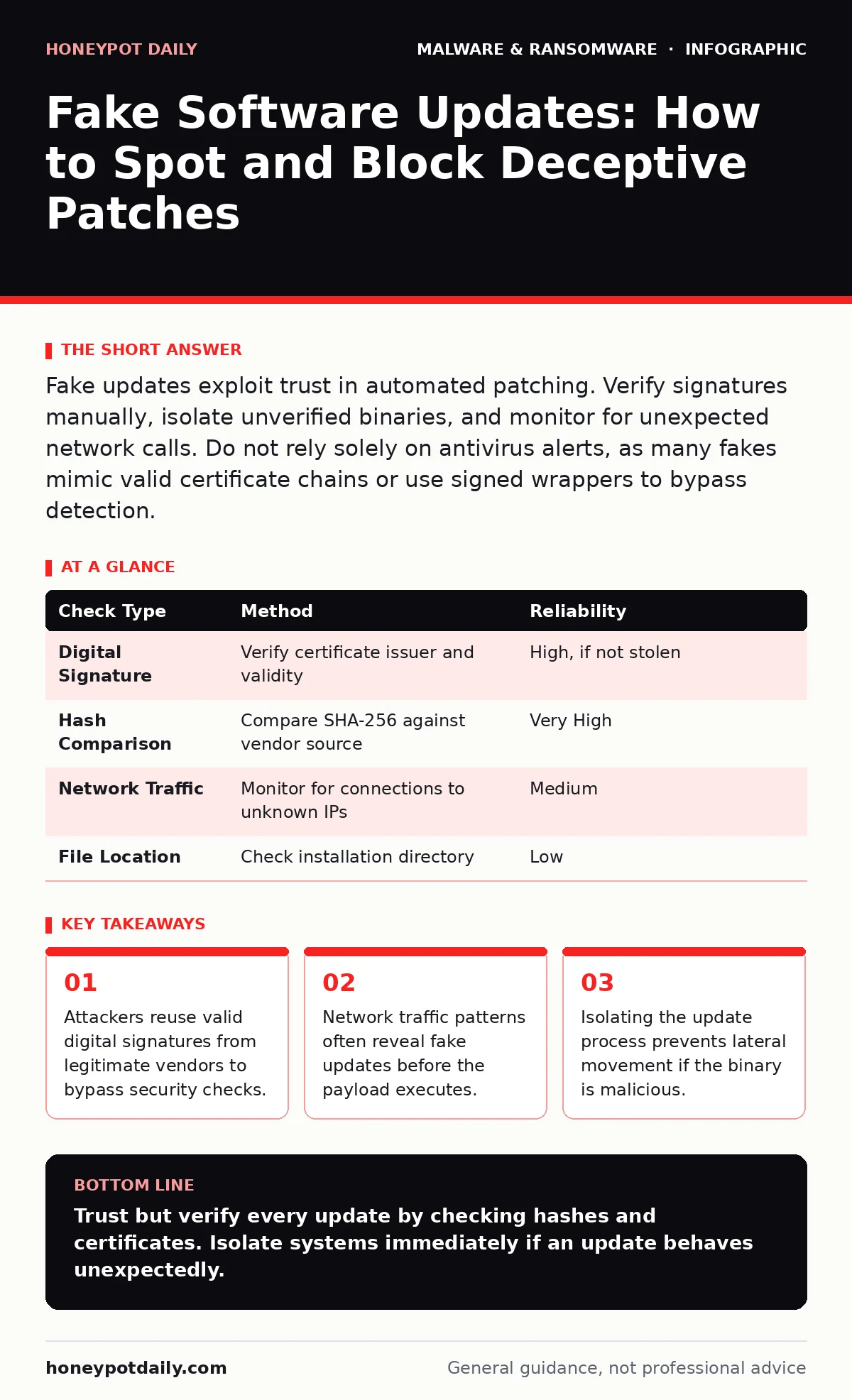
Fake updates exploit trust in automated patching. Verify signatures manually, isolate unverified binaries, and monitor for unexpected network calls. Do not rely solely on antivirus alerts, as many fakes mimic valid certificate chains or use signed wrappers to bypass detection.
How do attackers distribute fake software updates?
Attackers distribute fake updates through compromised update servers, man-in-the-middle attacks on HTTP connections, and phishing emails that mimic vendor notifications. They exploit the expectation that software will update automatically. The user often sees a familiar interface or a generic progress bar. This familiarity reduces suspicion and encourages immediate acceptance. The mechanism relies on the user’s trust in the software vendor rather than technical verification.
Can a fake update bypass antivirus protection?
Yes, a fake update can bypass antivirus protection by using a valid digital signature from a legitimate vendor. Attackers achieve this by stealing certificate private keys or using stolen credentials to sign malicious code. The antivirus sees the valid signature and assumes the file is safe. This is known as a trusted certificate abuse. The malware remains dormant until it triggers its payload, often after the initial scan has completed. This technique renders signature-based detection ineffective.
See also: next-generation antivirus
What signs indicate an update is not genuine?
Look for mismatches in the file path, unexpected network connections, and missing digital signatures. A genuine update usually downloads from a known domain and installs in a standard system directory. If the file lands in a temporary folder or the user’s profile directory, it is suspicious. Check the certificate details for the issuing authority and validity period. A mismatched domain or an expired certificate is a clear indicator of tampering. Also, watch for high CPU usage during a simple patch installation.
Why do users click on fake update prompts?
Users click on fake update prompts because they fear security vulnerabilities and system instability. The prompts often use urgent language and red warning icons to create anxiety. This psychological pressure overrides rational verification steps. Attackers design these interfaces to look identical to the operating system or application. The goal is to trigger a reflexive action rather than a deliberate decision. This exploit targets human psychology, not just technical weaknesses.
How can you verify the integrity of an update?
Verify the integrity by checking the cryptographic hash of the downloaded file against the vendor’s published hash. Most vendors provide SHA-256 hashes for their releases on their official download pages. Calculate the hash of the local file using a standard tool. If the hashes do not match exactly, the file has been altered. This method confirms the file has not been tampered with since it was signed. It is a definitive check that does not rely on heuristics.
| Check Type | Method | Reliability |
|---|---|---|
| Digital Signature | Verify certificate issuer and validity | High, if not stolen |
| Hash Comparison | Compare SHA-256 against vendor source | Very High |
| Network Traffic | Monitor for connections to unknown IPs | Medium |
| File Location | Check installation directory | Low |
What happens if a fake update is installed?
If a fake update is installed, the malware gains the same privileges as the legitimate software. This often includes administrator rights, allowing it to modify system files and install persistence mechanisms. It may disable security tools or create new user accounts for remote access. The malware can then scan the network for other vulnerable systems. This lateral movement spreads the infection quickly. The damage extends far beyond the initial compromised machine.
How do you detect a fake update in progress?
Detect a fake update by monitoring for unexpected outbound connections and process injections. Use endpoint detection and response tools to alert on new processes spawned by the update service. Look for connections to IP addresses that do not belong to the vendor. Analyze the behaviour of the update process for signs of data exfiltration. A legitimate update uploads telemetry, not large volumes of user data. Anomalies in data volume or destination are strong indicators.
Can you reverse the damage of a fake update?
Reversing the damage requires isolating the affected system and performing a full forensic analysis. Simply uninstalling the software may not remove all components or persistence mechanisms. The malware might have created hidden accounts or modified registry keys. A complete reimaging of the operating system is often the safest option. This ensures no hidden backdoors remain. Backup data from before the infection time to restore files safely.
See also: reimaging infected computers
How do you prevent fake update attacks?
Prevent fake update attacks by enforcing strict application control and verifying update sources. Configure systems to only accept updates from whitelisted domains and verified certificates. Disable automatic updates for critical applications if manual verification is possible. Educate users to pause and verify before accepting any update prompt. Implement network segmentation to limit the impact of a compromised machine. Regular audits of update logs help identify anomalies early.
Why is manual verification often skipped?
Manual verification is skipped because it adds friction to the user experience and IT workflows. Users want convenience and speed, while IT teams manage thousands of endpoints. Automated processes assume trust in the vendor’s infrastructure. This assumption is the root cause of the vulnerability. Attackers exploit this efficiency gap. The trade-off between convenience and security often favours convenience, leaving the door open for deception.
See also: memory forensics
Key takeaways
- Attackers reuse valid digital signatures from legitimate vendors to bypass security checks.
- Network traffic patterns often reveal fake updates before the payload executes.
- Isolating the update process prevents lateral movement if the binary is malicious.
Trust but verify every update by checking hashes and certificates. Isolate systems immediately if an update behaves unexpectedly.
Frequently asked questions
Is it safe to update software over public Wi-Fi?
No, public Wi-Fi is vulnerable to man-in-the-middle attacks that can intercept and replace update files. Use a VPN or wait for a secure connection.
Do mobile apps face the same fake update risks?
Yes, mobile apps can be sideloaded with malicious versions or updated via compromised app stores. Only install from official stores.
Can a fake update steal passwords directly?
Yes, if it installs a keylogger or credential harvester, it can capture passwords as you type them into other applications.
How often should I verify update sources?
Verify sources every time you install a new version or patch, especially for critical security software and operating systems.
How this guide was produced: written by the Honeypot Daily editorial team with AI assistance, checked against the public references listed below, and reviewed when the facts change. See our editorial policy or report an error.